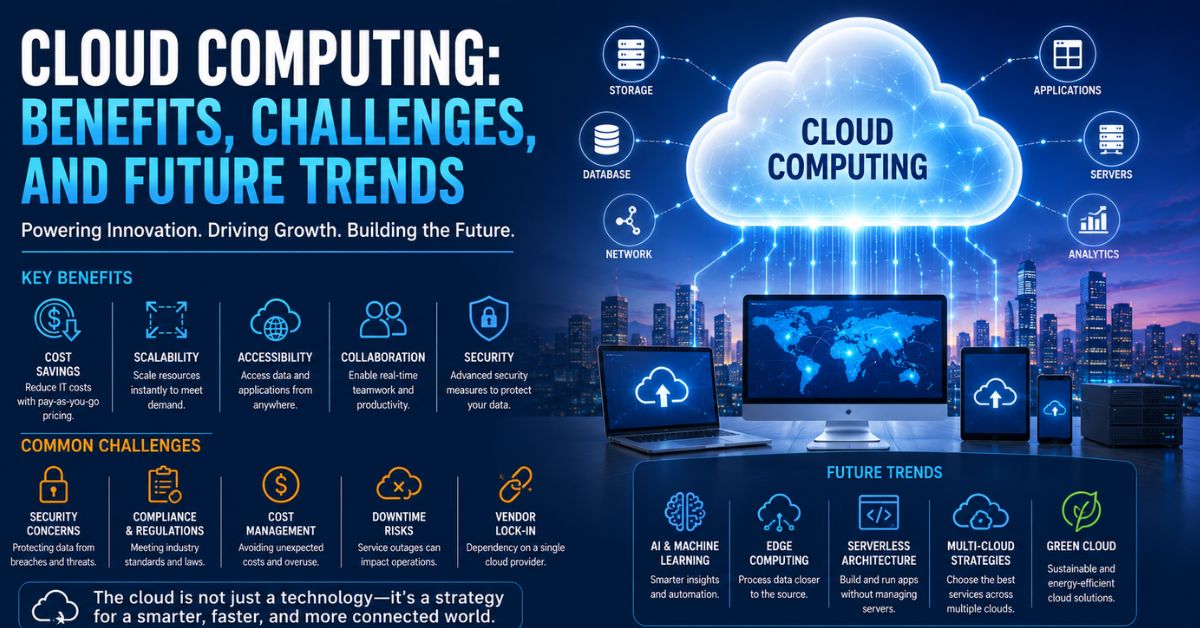
The cloud is no longer the future of business—it is the foundation of modern digital transformation.
From startups to global enterprises, organizations are moving their operations, applications, and data to the cloud at record speed.
The reason is simple: cloud computing delivers flexibility, scalability, and innovation that traditional IT systems cannot match.
Introduction
Over the last decade, cloud computing has revolutionized the way businesses, governments, educational institutions, and individuals access technology. Instead of relying on expensive physical servers and complex on-premises infrastructure, organizations can now store data, run applications, and access computing resources through the internet.
Cloud computing has become one of the most important technological innovations of the digital age. It powers everything from online banking and video streaming services to artificial intelligence platforms and enterprise software solutions. Companies use cloud services to improve efficiency, reduce costs, enhance collaboration, and accelerate innovation.
The rapid adoption of cloud technology has transformed industries worldwide. Businesses can launch new products faster, support remote workforces, scale operations instantly, and access cutting-edge technologies without significant upfront investments.
Despite its many advantages, cloud computing also presents challenges related to security, compliance, data privacy, and operational management. Understanding both the opportunities and risks is essential for organizations seeking to maximize the value of cloud technology.
This article explores cloud computing, its major benefits, common challenges, and the future trends shaping the next generation of cloud services.
What Is Cloud Computing?
Cloud computing refers to the delivery of computing services over the internet rather than through local servers or personal devices.
These services may include:
- Data storage
- Servers
- Networking
- Databases
- Software applications
- Analytics
- Artificial intelligence
- Security services
Instead of purchasing and maintaining physical infrastructure, organizations rent computing resources from cloud service providers.
Users can access these resources whenever needed and pay only for what they use.
How Cloud Computing Works
Cloud providers maintain large data centers that house servers, storage systems, and networking equipment.
When users access cloud services:
- Data is stored on remote servers.
- Applications run in cloud environments.
- Resources are delivered through internet connections.
- Capacity can be adjusted instantly based on demand.
This model eliminates many of the limitations associated with traditional IT infrastructure.
Types of Cloud Computing
Public Cloud
Public cloud services are provided by third-party vendors and shared among multiple customers.
Benefits include:
- Lower costs
- High scalability
- Easy deployment
Public cloud solutions are widely used by businesses of all sizes.
Private Cloud
Private cloud environments are dedicated to a single organization.
Advantages include:
- Greater control
- Enhanced security
- Customization options
Private clouds are common in industries with strict compliance requirements.
Hybrid Cloud
Hybrid cloud combines public and private cloud environments.
Organizations can:
- Keep sensitive data in private clouds
- Use public clouds for scalability and flexibility
This approach provides the best of both worlds.
Multi-Cloud
A multi-cloud strategy involves using services from multiple cloud providers.
Benefits include:
- Reduced vendor dependence
- Improved resilience
- Greater flexibility
Many organizations are adopting multi-cloud environments to optimize performance and reliability.
Related post: The Future of Artificial Intelligence: How AI is Shaping Our World
Cloud Service Models
Infrastructure as a Service (IaaS)
IaaS provides virtualized computing resources through the internet.
Examples include:
- Virtual servers
- Storage systems
- Networking infrastructure
Businesses gain flexibility without purchasing hardware.
Platform as a Service (PaaS)
PaaS provides a platform for developing and deploying applications.
Developers can focus on coding without managing underlying infrastructure.
Benefits include:
- Faster development
- Reduced complexity
- Improved productivity
Software as a Service (SaaS)
SaaS delivers software applications through web browsers.
Examples include:
- Email services
- Customer relationship management software
- Collaboration tools
Users can access applications from anywhere with an internet connection.
Top Benefits of Cloud Computing
Cost Savings
One of the biggest advantages of cloud computing is reduced IT costs.
Organizations no longer need to:
- Purchase expensive servers
- Maintain data centers
- Invest heavily in hardware upgrades
Cloud services operate on a pay-as-you-go model, making technology more affordable.
Scalability and Flexibility
Cloud environments allow organizations to scale resources up or down instantly.
This flexibility is especially valuable during:
- Seasonal demand spikes
- Business expansion
- Product launches
Businesses only pay for the resources they actually use.
Improved Accessibility
Cloud-based services can be accessed from virtually anywhere.
Employees can:
- Work remotely
- Access files securely
- Collaborate across locations
This accessibility supports modern hybrid work environments.
Enhanced Collaboration
Cloud platforms enable real-time collaboration among teams.
Employees can:
- Share documents
- Edit files simultaneously
- Communicate instantly
Improved collaboration boosts productivity and teamwork.
Faster Deployment
Traditional infrastructure deployment can take weeks or months.
Cloud services can often be deployed within minutes.
Organizations can:
- Launch applications quickly
- Respond faster to market opportunities
- Accelerate innovation
Business Continuity and Disaster Recovery
Cloud providers offer backup and recovery solutions that help protect critical data.
Benefits include:
- Reduced downtime
- Faster recovery
- Improved resilience
Organizations can continue operating even during unexpected disruptions.
Automatic Updates
Cloud providers regularly update systems and applications.
This ensures:
- Improved performance
- Enhanced security
- Access to new features
Businesses benefit without managing updates themselves.
Access to Advanced Technologies
Cloud platforms provide access to:
- Artificial intelligence
- Machine learning
- Big data analytics
- Internet of Things services
Organizations can adopt emerging technologies more easily.
How Cloud Computing Supports Digital Transformation
Accelerating Innovation
Cloud computing allows businesses to experiment and innovate rapidly.
Organizations can:
- Test new ideas
- Develop applications faster
- Deploy services globally
Innovation becomes more accessible and cost-effective.
Supporting Remote Work
The rise of remote work has increased reliance on cloud technology.
Cloud platforms enable:
- Virtual collaboration
- Secure file sharing
- Remote access to systems
Employees remain productive regardless of location.
Enabling Data-Driven Decision Making
Cloud analytics tools help organizations analyze vast amounts of information.
This enables:
- Better forecasting
- Improved planning
- Enhanced customer insights
Data becomes a strategic asset.
Challenges of Cloud Computing
Despite its many benefits, cloud computing also presents challenges.
Security Concerns
Security remains one of the biggest concerns for organizations adopting cloud services.
Potential risks include:
- Unauthorized access
- Data breaches
- Cyberattacks
Strong security strategies are essential.
Data Privacy Issues
Organizations must ensure compliance with privacy regulations when storing data in cloud environments.
Important considerations include:
- Data ownership
- User consent
- Regulatory requirements
Protecting sensitive information is a critical responsibility.
Compliance and Regulatory Challenges
Different industries face specific compliance obligations.
Examples include:
- Healthcare regulations
- Financial regulations
- Government security standards
Organizations must ensure cloud providers meet applicable requirements.
Downtime Risks
Although cloud services are highly reliable, outages can still occur.
Service disruptions may affect:
- Productivity
- Customer experiences
- Business operations
Organizations should implement backup strategies and redundancy measures.
Vendor Lock-In
Moving data and applications between providers can be complex.
Vendor lock-in may limit flexibility and increase long-term costs.
Many businesses address this challenge through multi-cloud strategies.
Cost Management Complexity
While cloud services can reduce costs, poor resource management can lead to unexpected expenses.
Organizations must monitor usage carefully.
Cloud Security Best Practices
Implement Strong Access Controls
Organizations should use:
- Multi-factor authentication
- Role-based access controls
- Strong password policies
These measures reduce security risks.
Encrypt Sensitive Data
Encryption protects information both:
- In transit
- At rest
This adds an important layer of security.
Conduct Regular Security Audits
Frequent assessments help identify vulnerabilities before they become major issues.
Train Employees
Human error remains a leading cause of security incidents.
Security awareness training is essential.
Cloud Computing Across Industries
Healthcare
Healthcare organizations use cloud technology for:
- Electronic health records
- Telemedicine
- Medical research
Cloud services improve patient care and operational efficiency.
Education
Educational institutions rely on cloud platforms for:
- Online learning
- Virtual classrooms
- Student collaboration
Cloud technology expands access to education.
Financial Services
Banks and financial institutions use cloud computing to:
- Improve customer experiences
- Enhance fraud detection
- Support digital banking
Retail
Retailers leverage cloud solutions for:
- Inventory management
- E-commerce operations
- Customer analytics
Cloud computing improves operational efficiency and personalization.
Manufacturing
Manufacturers use cloud platforms for:
- Supply chain management
- Predictive maintenance
- Industrial IoT applications
These solutions improve productivity and reduce costs.
Future Trends in Cloud Computing
Artificial Intelligence and Cloud Integration
AI and cloud computing are becoming increasingly interconnected.
Cloud platforms provide the computing power needed to train and deploy AI systems.
Future applications will include:
- Intelligent automation
- Advanced analytics
- Predictive business insights
Edge Computing
Edge computing processes data closer to where it is generated.
Benefits include:
- Lower latency
- Faster processing
- Improved performance
This trend is particularly important for IoT applications.
Serverless Computing
Serverless architecture allows developers to build applications without managing servers.
Advantages include:
- Reduced operational complexity
- Faster development
- Lower infrastructure costs
Serverless adoption is expected to grow significantly.
Green Cloud Computing
Sustainability is becoming a priority for organizations worldwide.
Cloud providers are investing in:
- Renewable energy
- Energy-efficient data centers
- Carbon reduction initiatives
Green cloud computing supports environmental goals.
Multi-Cloud Expansion
More organizations are adopting multi-cloud strategies to improve resilience and flexibility.
Benefits include:
- Reduced dependence on a single provider
- Better workload optimization
- Enhanced disaster recovery
Cloud-Native Development
Businesses increasingly build applications specifically for cloud environments.
Cloud-native technologies support:
- Faster innovation
- Improved scalability
- Better performance
The Future of Cloud Computing in Business
Cloud computing will continue to serve as a cornerstone of digital transformation.
Organizations will increasingly use cloud platforms to:
- Drive innovation
- Improve customer experiences
- Enhance operational efficiency
- Support global growth
The combination of cloud computing, artificial intelligence, automation, and advanced analytics will create powerful opportunities for businesses across every industry.
Companies that embrace cloud technologies strategically will be better positioned to compete in a rapidly evolving digital economy.
Conclusion
Cloud computing has transformed the technology landscape by making powerful computing resources more accessible, scalable, and cost-effective. Its benefits—including flexibility, collaboration, business continuity, and innovation—have made it an essential component of modern business operations.
While challenges such as security, compliance, and cost management require careful attention, the advantages of cloud technology continue to outweigh the risks for most organizations. As emerging trends such as artificial intelligence, edge computing, serverless architecture, and green cloud initiatives gain momentum, cloud computing will play an even greater role in shaping the future of business and technology.
Organizations that invest in cloud strategies today will be better equipped to adapt, innovate, and thrive in tomorrow’s digital world.
Frequently Asked Questions (FAQs)
What is cloud computing?
Cloud computing is the delivery of computing services such as storage, servers, software, and databases over the internet.
What are the main benefits of cloud computing?
Key benefits include cost savings, scalability, flexibility, improved collaboration, enhanced accessibility, and faster deployment.
What are the types of cloud computing?
The main types are public cloud, private cloud, hybrid cloud, and multi-cloud environments.
What is the difference between IaaS, PaaS, and SaaS?
IaaS provides infrastructure, PaaS provides development platforms, and SaaS delivers software applications through the internet.
Is cloud computing secure?
Cloud computing can be highly secure when organizations implement strong security practices such as encryption, access controls, and regular monitoring.
What are the biggest challenges of cloud computing?
Common challenges include security concerns, compliance requirements, downtime risks, vendor lock-in, and cost management.
How does cloud computing support remote work?
Cloud services enable employees to access applications, files, and collaboration tools from any location with internet connectivity.
What is edge computing?
Edge computing processes data closer to its source, reducing latency and improving performance.
What is serverless computing?
Serverless computing allows developers to build applications without managing servers, simplifying development and reducing infrastructure complexity.
What is the future of cloud computing?
The future includes greater integration with AI, increased adoption of edge computing, serverless architectures, green cloud initiatives, and multi-cloud strategies.